StudyPapers.co.za
Advertisement

This page has every Computer Practice N5 June paper we have, from 2013 to 2021: 6 question papers and 6 memos in 18 PDFs. Files are in Afrikaans. The newest year is first. Each paper shows the first page of questions, its marks and time, and what the questions cover.

Computer Practice N5 June papers by year

YearExamsPapersPDFs
2021June14
2019June14
2018June14
2016June12
2014June12
2013June12
Advertisement

Computer Practice N5 June 2021 question papers and memos

June 2021

Computer Practice N5 June 2021 question paper, first page of questions
Computer Practice N5 June 2021 question paper

200 marks · 3 hours · 19 pages · 9 questions

What is in this paper (9 questions)
  1. Q1 Indicate whether the following statements are TRUE or FALSE. Choose the answer 5 marks
  2. Q2 Various options are given as possible answers to the following questions. Choose the 5 marks
  3. Q3 Open the file structure saved in the COMPUTER PRACTICE N5 folder. 40 marks
  4. Q5 You are the CEO of the South African Rugby Federation and you need to send letters 30 marks
  5. Q6 1. Retrieve the spreadsheet saved as QUESTION 6A from your diskette/hard 70 marks
  6. Q7 Create a database using the file name SPRINGBOKS. 7 marks
  7. Q8 8.1 Create the following records: 8 marks
  8. Q9 9.1 Insert the record of Nols Gerecke, Stormers, 20, Centre, 101 kg. 4 marks
  9. Q10 Create a report to include the following information: 5 marks

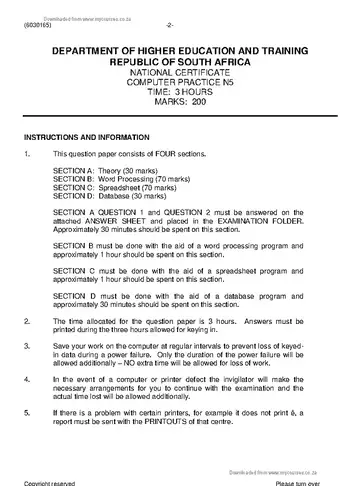
Instructions to candidates

  1. This question paper consists of FOUR sections:
Advertisement

Computer Practice N5 June 2019 question papers and memos

June 2019

Computer Practice N5 June 2019 question paper, first page of questions
Computer Practice N5 June 2019 question paper

200 marks · 3 hours · 21 pages · 8 questions

What is in this paper (8 questions)
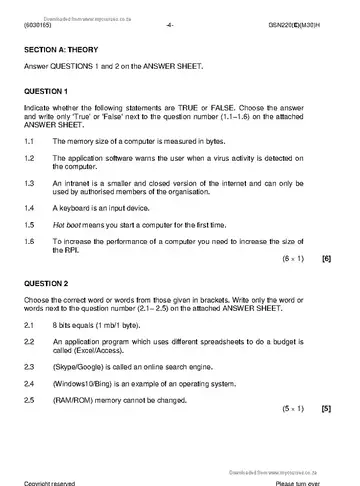
  1. Q1 Various options are given as possible answers to the following questions. Choose the 5 marks
  2. Q2 Choose the correct word or words from those given in brackets. Write only the word or 4 marks
  3. Q3 Open the file structure in the COMPUTER PRACTICE N5 folder. 40 marks
  4. Q5 As the event's organiser at Prickly Taste Bud you need to send letters to members to 30 marks
  5. Q6 This document has already been keyed in on your diskette/hard drive as 70 marks
  6. Q7 Create a database using the file name COFFEE. 7 marks
  7. Q8 8.1 Create the following records in table format: 12 marks
  8. Q9 Create a report to include the following information: 4 marks

Instructions to candidates

  1. This question paper consists of FOUR sections.

Computer Practice N5 June 2018 question papers and memos

June 2018

Computer Practice N5 June 2018 question paper, first page of questions
Computer Practice N5 June 2018 question paper

200 marks · 3 hours · 17 pages · 9 questions

What is in this paper (9 questions)
  1. Q1 Indicate whether the following statements are TRUE or FALSE. Choose the answer 6 marks
  2. Q2 Choose the correct word or words from those given in brackets. Write only the word or 5 marks
  3. Q3 This file structure was saved by the lecturer on the diskette/hard drive. 19 marks
  4. Q4 This document has already been keyed in on your diskette/hard drive as 38 marks
  5. Q5 You are the manager at Wellness Palace and you need to send invitation letters to the 32 marks
  6. Q6 This document has already been keyed in on your diskette/hard drive as 70 marks
  7. Q7 Use a database to prepare a programme summary of contenders who are participating 7 marks
  8. Q8 8.1 Create the following records: 10 marks
  9. Q9 Create a report to include the following information: 5 marks

Instructions to candidates

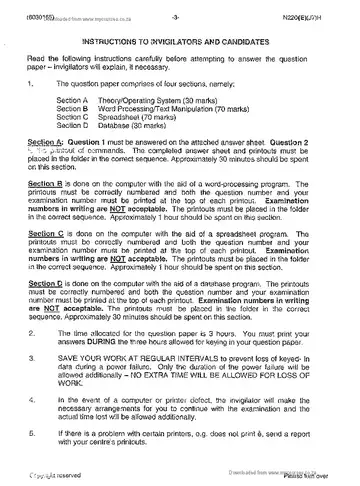
  1. Answer ALL the questions.
  2. Read ALL the questions carefully.
  3. Number the answers according to the numbering system used in this question paper.
  4. The time indicated at the beginning of each section is a guideline to help you finish the question paper.
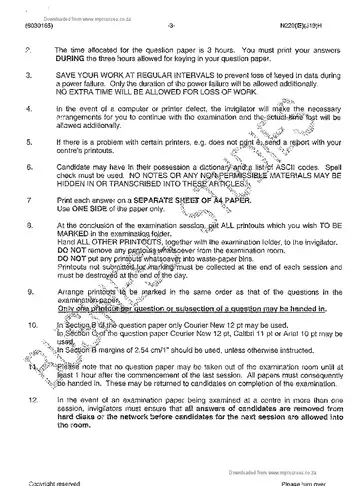
  5. The time allocated for this question paper includes printing time. 6 It is the candidate's responsibility to save the work at regular intervals to prevent loss of keyed-in data during a power failure. NO additional time will be allowed to complete lost work.
  6. In the event of a power failure or a computer or printer defect, the invigilator will make the necessary arrangements for the candidate to continue with the examination and the actual time lost will be allowed additionally.
  7. The EXAMINATION NUMBER and the CENTRE NUMBER must be written on the cover of the EXAMINATION FOLDER and the software version must be indicated at the top of the cover page (e.g. MS Office 2010).
  8. Ensure that every PRINTOUT displays the QUESTION NUMBER and EXAMINATION NUMBER as instructed.
  9. EXAMINATION NUMBERS in writing are NOT acceptable.
  10. Marks will NOT be awarded for PRINTOUTS without EXAMINATION NUMBERS.
  11. Use appropriate application programs and place the PRINTOUTS in the EXAMINATION FOLDER. (6030165) -3- GSN220(E)(M30)H
  12. PRINTOUTS to be marked must be arranged in the same order as the questions in the question paper. Only ONE PRINTOUT per question may be handed in.
  13. Each answer must be printed on a separate sheet of paper. Use ONE side of the paper only.
  14. A spelling checker may be used.
Advertisement

Computer Practice N5 June 2016 question papers and memos

Computer Practice N5 June 2014 question papers and memos

Computer Practice N5 June 2013 question papers and memos

More Computer Practice N5 papers

All Computer Practice N5 past papers and memos

Questions about these papers

Which years of Computer Practice N5 June papers are on this page?

Papers from 2021, 2019, 2018, 2016, 2014, 2013. The newest year is at the top.

How many marks is the Computer Practice N5 June paper?

The paper is usually out of 200 marks and you get 3 hours to write it.

Are the memos included?

Yes. 6 of the 6 papers on this page have their marking memo next to the question paper.

Advertisement

Always free

Every paper and memo is a free PDF

Memos included

Mark your work with official memos

All provinces

DBE plus all nine provinces

Phone friendly

Fast pages, light on data