May/June 2024 Paper 1 (IEB)
3 hours · 2 pages · 9 questions
The memo for this paper is not available yet.
What is in this paper (9 questions)
- Q1 Open and work only in the folder named Q1.
- Q2 Open and work only in the folder named Q2.
- Q3 Open and work only in the folder named Q3.
- Q4 Open and work only in the folder named Q4.
- Q5 Open and work only in the folder named Q5.
- Q6 Open and work only in the folder named Q6.
- Q7 Open and work only in the folder named Q7.
- Q8 Open and work only in the folder named Q8.
- Q9 Open and work only in the folder named Q9.
Instructions to candidates
- Before you begin, rename your Data Files folder to your examination number. E.g.: Data Files becomes 1234567890.
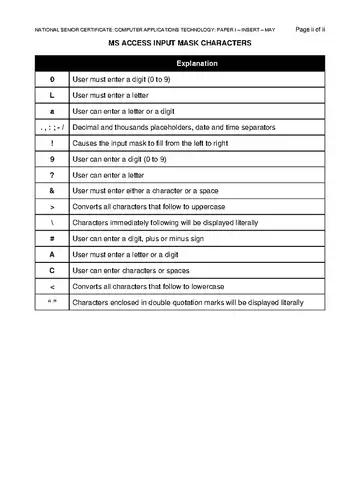
- This question paper consists of 17 pages and an appendix (HTML Tag List and Input Mask Character Sheet) of 2 pages (i–ii). Please check that your question paper is complete.
- The examination consists of 5 sections and 9 questions. All questions in all sections must be answered.
- You must use a text editor for the HTML section. Acceptable applications are Notepad, Notepad++ or WordPad. Microsoft Word may NOT be used for HTML coding.
- Use functions and/or formulas to calculate answers, unless otherwise instructed.
- Take note of the mark allocation to ascertain the complexity of the solution required and the amount of time you should spend on each question.
- If you are unable to get a formula/function to work correctly: open the Student_Screenshots document; indicate the question number; paste a screenshot showing the issue and provide a brief explanation to obtain part marks; you may then leave it out of the spre
- Screenshots should be appropriately cropped to display all relevant information only.
- Unless other instructions are given, all word-processing documents should be set up as follows: • Measuring units – centimetres (cm) • Language – English (South Africa) • Page size – A4 • Margins – 2.54 cm
- You may use the offline help function, if available, in each application. NATIONAL SENIOR CERTIFICATE: COMPUTER APPLICATIONS TECHNOLOGY: PAPER I – MAY Page 2 of 17
- Figures in the question paper have a border. When a figure is provided as part of a question, you are not expected to add the border unless instructed to do so.
- Do NOT rename any files or folders unless instructed to do so.
- Do NOT create any folders or sub-folders unless instructed to do so.
- Do NOT delete, move or duplicate any files or folders unless instructed to do so.